8 Performance Issues We Found Auditing Australian WooCommerce Stores (and How We Fixed Each One)

Get Your Free Website Audit
($3,000 Value)
- Uncover performance issues
- Identify SEO opportunities
- Security gaps, and quick wins
Table of Contents
We audit a lot of WooCommerce stores. Different industries, different themes, different budgets, and the same problems every time. So we went back through the records and counted.
Every store we audited was failing Google’s Core Web Vitals before we stepped in. Eight culprits were behind most of it, and the worst offenders weren’t the obvious ones. They were WooCommerce-specific issues that generic speed guides never mention, quietly draining sales on every page load.
Key takeaways
- We reviewed the performance records of the WooCommerce stores we audit and maintain. All of them were failing Core Web Vitals before our work.
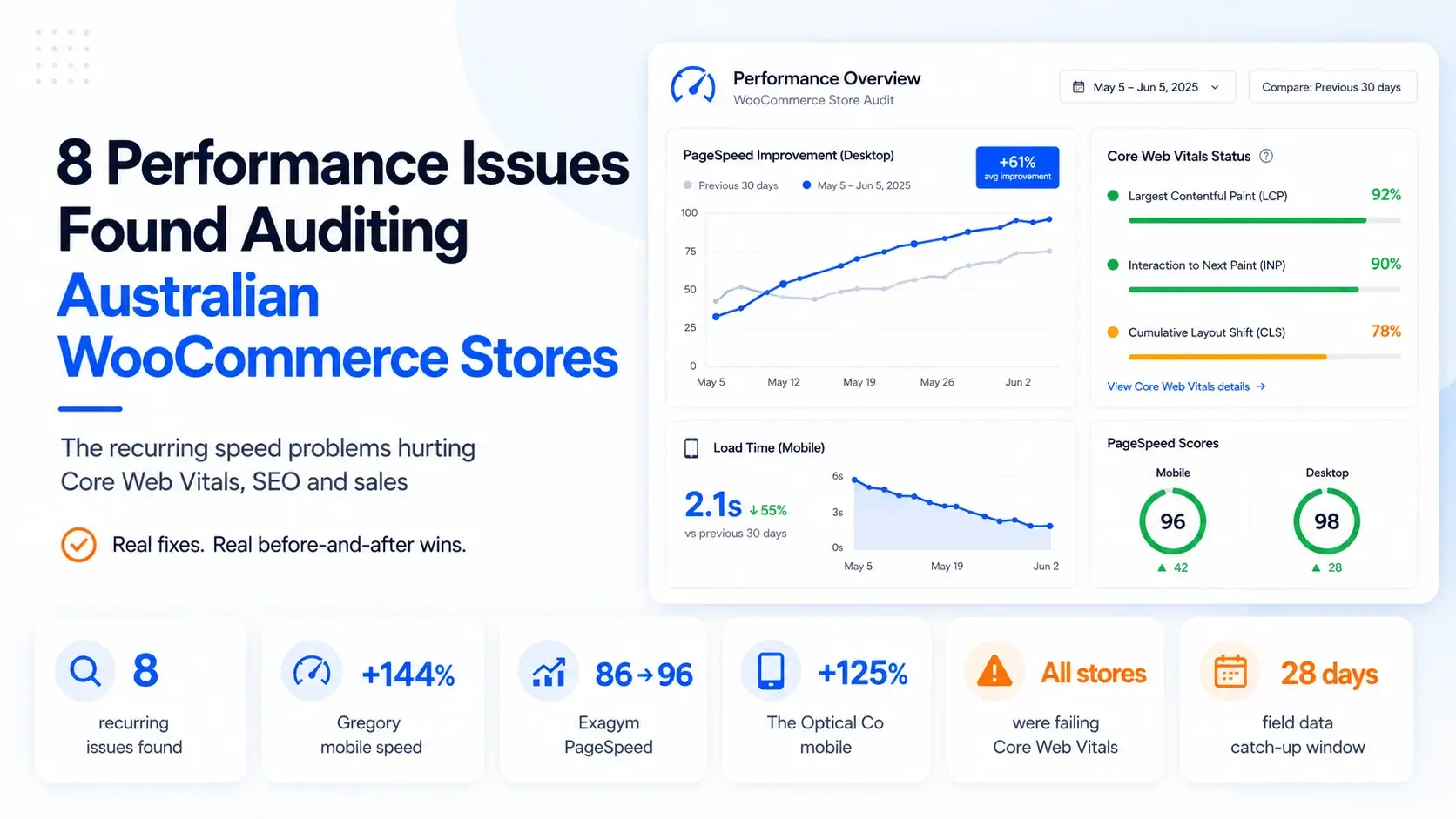
- The same 8 culprits kept recurring: no real caching, bloated plugin stacks, render-blocking scripts and fonts, oversized images, WooCommerce cart-fragment AJAX, layout shift from hero media, under-spec hosting, and years of accumulated code cruft.
- Real wins from the sample: Gregory Jewellers +144% mobile PageSpeed (27 → 66); Exagym PageSpeed 86 → 96 with load time cut from 1.42s to ~0.5s; The Optical Co +125% mobile speed.
- Most fixes are not rebuilds. Caching, image optimisation and trimming plugins do most of the heavy lifting.
- Honest caveat we tell every client: lab fixes pass first, field scores follow. Google’s field data runs on a rolling 28-day window, so PageSpeed can still show “failing” for weeks after the work is done.
The 8 culprits
The usual suspects
1. No real caching layer.
Without page and object caching, WordPress rebuilds every page from scratch on each visit. It’s the highest-leverage fix available and the one most often missing or misconfigured.
Fix: WP Rocket plus server-level caching, with cart, checkout and account pages excluded so nothing breaks.
Proof: adding caching (with image optimisation) took Exagym from PageSpeed 86 to 96 and load time from 1.42s to ~0.5s.
2. Bloated, outdated, conflicting plugins.
Stores accumulate plugins, and each one adds scripts, queries and risk. The Optical Co was running a heavy stack across a multisite group; Exagym carried 40-plus active plugins; Gregory’s speed problems traced partly to plugin conflicts.
Fix: audit every plugin, remove what isn’t earning its keep, replace overlapping ones, and update plugins, themes, PHP and core.
Proof: The Optical Co was carrying a heavy multisite stack (multiple Formidable add-ons, AJAX search, infinite scroll, gallery sliders); Exagym ran 40-plus active plugins, which we cut back and updated as part of its lift to PageSpeed 96.
3. Render-blocking JavaScript, CSS and fonts.
Scripts and fonts that the browser must process before it can paint anything leave shoppers staring at a blank screen. We found this at Gregory, Crown and TFO.
Fix: defer non-critical JS, inline critical CSS, fix font loading, and stop third-party tags blocking the page.
Proof: At TFO, we stopped images and fonts blocking the screen and told the browser to load the hero image first
4. Oversized, unoptimised images.
Product photography is usually the heaviest thing on the page and the biggest drag on Largest Contentful Paint.
Fix: compress and correctly size every image, serve modern formats (WebP/AVIF), lazy-load below the fold.
Proof: image optimisation was part of Gregory Jewellers’ jump to +144% mobile speed (27 → 66).
The WooCommerce-specific killers (the ones generic guides miss)
5. Cart-fragment AJAX flooding the server.
WooCommerce’s cart fragments fire AJAX requests to keep the cart count live, and the wrong side-cart plugin turns that into a flood. At Gregory Jewellers, a flyout-cart plugin was hammering admin-ajax.php on every page load, overwhelming the server.
Fix: replace or reconfigure the offending plugin, limit cart fragments to pages that need them, and move cart updates off the critical path.
Proof: WP Rocket tuning moved nothing at Gregory until we traced the storm of /?wc-ajax= requests to the side-cart plugin and shut it off. That was the real bottleneck, and it was invisible to a standard PageSpeed score.
6. Layout shift and slow LCP from hero media.
Big autoplay videos and images without reserved dimensions cause the page to jump as it loads, which Google penalises as Cumulative Layout Shift. At Crown Furniture (a WordPress retailer on our care plan), autoplay video in the hero was the LCP element and the main source of layout shift.
Fix: reserve space for media, preload the real hero element, and stop autoplay video from dominating first paint.

Slow website wasting your marketing spend?
- Uncover performance issues
- Identify SEO opportunities
- Security gaps, and quick wins
Proof: CLS dropped from 0.27 to 0.09 (into Google’s “Good” range) with LCP at 1.16s.
7. Under-spec or unstable hosting.
Cheap or wrongly configured hosting caps how fast any page can be, and on busy stores it causes outright downtime. TFO had repeated “site unresponsive / down” incidents; The Optical Co needed managed hosting for a multisite WooCommerce group.
Fix: move to managed WordPress hosting built for WooCommerce, with the right PHP version, server caching and headroom for sale-day spikes.
Proof: The Optical Co: +125% mobile / +102% desktop after migrating to managed hosting.
8. Years of accumulated code cruft.
Old stores carry dead files, duplicate assets and ageing build tooling that no one ever cleaned up. At TFO we swapped an ageing build tool for a current one and cleared out years of dead and duplicate files.
Fix: modernise the build pipeline, strip unused code, and stop shipping assets the store no longer uses.
Proof: TFO: Mobile PageSpeed improved from 15 to 88.
Learn more about these projects in our Case Studies.
Summary table
| Culprit | Where we saw it | The fix | Real result |
| No real caching | Exagym, Gregory, Crown, TFO | WP Rocket + server caching | Exagym 86 → 96 PageSpeed, 1.42s → ~0.5s |
| Bloated / outdated plugins | Optical Co, Exagym, Gregory | Audit, trim, update | 40+ plugins trimmed at Exagym (part of 86 → 96); conflicts cleared at Gregory |
| Render-blocking JS/CSS/fonts | Gregory, Crown, TFO | Defer JS, inline critical CSS | Part of Crown CLS 0.27 → 0.09; first-paint fixed at TFO |
| Oversized images | Gregory, Exagym | Compress, resize, WebP/AVIF, lazy-load | Gregory 27 → 66 mobile (+144%) |
| Cart-fragment AJAX flood | Gregory | Replace side-cart plugin, limit fragments | Removed server-overwhelming AJAX storm |
| Layout shift / hero media | Crown | Reserve space, preload LCP, tame video | CLS 0.27 → 0.09; LCP 1.16s |
| Under-spec / unstable hosting | TFO, Optical Co | Managed WooCommerce hosting | Optical Co +125% mobile / +102% desktop |
| Accumulated code cruft | TFO | Modernise build, clear dead files | TFO: Mobile PageSpeed improved from 15 to 88 |
How We Ran This Audit
This data comes from the audit, care-plan and maintenance records of the WooCommerce stores we’ve worked on, reviewed in June 2026. We assess performance with Google PageSpeed Insights and GTmetrix (scores, load time and Core Web Vitals) and Ahrefs for search and technical impact, and we track Core Web Vitals through Google’s field data over time.
We’re transparent about scope: this is a focused set of stores we have documented before-and-after data for 2020–2026, not a national survey. Frequencies are directional. Lab scores reflect each store at audit and after our fixes; field scores follow on Google’s rolling 28-day window.
If you need support for your WooCommerce store, book a free consultation session with our team.
Frequently Asked Questions:
Why is my WooCommerce store slow?
Usually several things at once: no proper caching, too many plugins, render-blocking scripts, oversized images, and WooCommerce-specific issues like cart-fragment AJAX. In the stores we audited, it was rarely one big fault and almost always a stack of smaller ones.
Does site speed affect conversions?
Yes. Slower pages reduce conversions, hurt mobile shoppers most, and weaken SEO rankings and paid ad performance. For an online store, speed maps directly to revenue.
What is cart-fragment AJAX and why does it slow WooCommerce down?
WooCommerce uses AJAX requests to keep the live cart count updated. Some side-cart and flyout-cart plugins fire these on every page, flooding the server. Limiting cart fragments to the pages that need them is a common, high-impact WooCommerce fix.
How fast should a WooCommerce store load?
Aim for Largest Contentful Paint under 2.5 seconds and a “Good” Core Web Vitals pass on mobile. Real-world load time and Core Web Vitals matter more than the headline PageSpeed score.
Can you fix WooCommerce speed without rebuilding the site?
Usually, yes. Most wins in our sample came from caching, image optimisation, trimming plugins and better hosting, not a rebuild.
My developer fixed it but PageSpeed still says failing. Why?
Google’s field score uses a rolling 28-day window, so it lags the actual fix. Lab tools like Lighthouse update immediately; the field score catches up over the following weeks. For more practical steps, read our guide, “How To Score 100 On Google PageSpeed Insights Test.”

Get Your Free Website Audit
($3,000 Value)
- Uncover performance issues
- Identify SEO opportunities
- Security gaps, and quick wins