Astro vs WordPress: Which Is Better for Your Site in 2026?

Get Your Free Website Audit
($3,000 Value)
- Uncover performance issues
- Identify SEO opportunities
- Security gaps, and quick wins
Astro has become one of the most talked-about alternatives to WordPress for fast, modern websites. But the choice is not simply ‘new framework versus old CMS’.
Astro gives developers more control over performance and front-end architecture. WordPress gives marketing teams more control over content, integrations and day-to-day updates.
The better option depends on who manages the site, how often it changes and what the business needs after launch.
In this guide, we compare Astro vs WordPress across speed, SEO, content management, security, cost and long-term support, including when a headless setup makes sense.
Quick Answer: Is Astro or WordPress Better?
Astro is better for developer-led sites where speed is the top priority. WordPress is better for marketing teams who need to publish, edit and integrate without a developer.
- Choose Astro for developer-run marketing sites, blogs and documentation where content changes rarely.
- Choose WordPress when a marketing team publishes often, relies on integrations or runs an online store.
- Consider headless WordPress with Astro when you need both and can support two systems.
Put simply, Astro is built around how a site is delivered, while WordPress is built around how a site is managed.
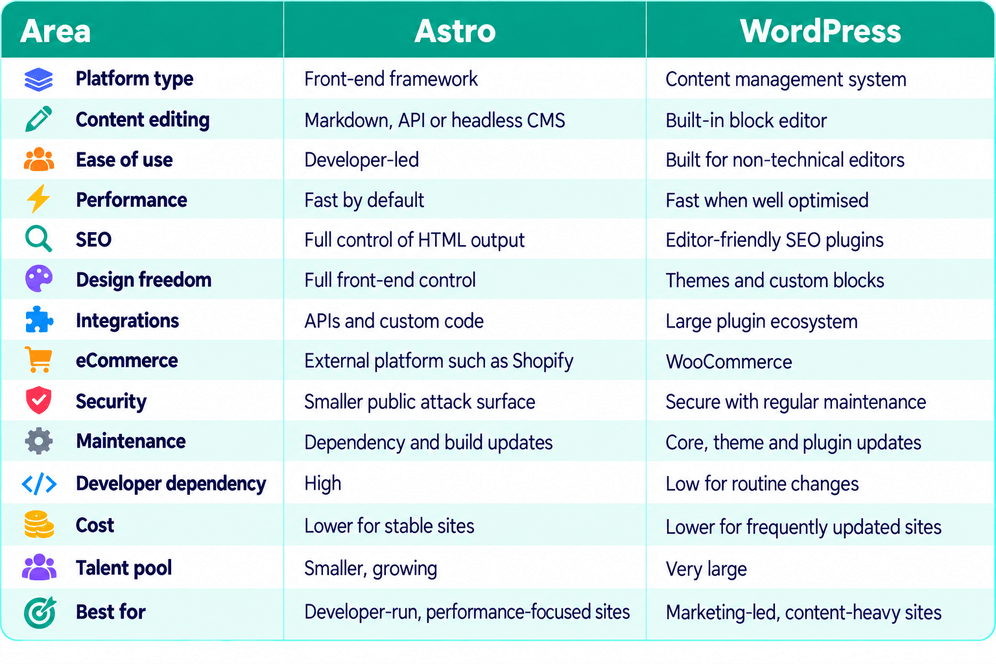
Astro vs WordPress: Quick Comparison
What Is Astro?
Astro is an open-source framework built for fast, content-focused websites. It is not a CMS, so there is no visual editing dashboard by default.
- Pages can be pre-rendered as static HTML
- JavaScript is only loaded where interactivity is needed
- Content can come from Markdown files, APIs or a connected headless CMS
Astro works particularly well for blogs, documentation and performance-focused marketing sites.
The editing experience depends on the tools connected to it, which means non-technical teams usually need a CMS added as part of the build.
What Is WordPress?
WordPress is an open-source content management system that combines content editing, publishing and website management in one platform.
- The block editor lets teams build and update pages without code
- The media library manages images and files
- A large plugin ecosystem adds SEO tools, forms, CRMs and other features
- WooCommerce adds full eCommerce functionality
WordPress is widely used for blogs, marketing sites, membership platforms and online stores.
It can also run headless, with WordPress managing the content while Astro or another framework handles the front end.
Astro vs WordPress: Key Differences Compared
Astro and WordPress can both deliver strong websites, but they differ in how they handle editing, performance, flexibility and ongoing ownership.
Below are the ten differences that matter most, with a verdict for each.
1. Ease of Use and Content Management
WordPress is easier for non-technical teams because content management is built in. Astro leaves the CMS choice to you, which adds setup before anyone can publish.
Astro
Astro is a framework, not a CMS. It supports Markdown natively, so changes are often made in a code editor, while content can also come from APIs or a connected headless CMS such as Sanity or Storyblok.
Even with a CMS, editors work within a defined content model. They can edit content, but new sections or structural changes still need a developer.
WordPress
WordPress, by contrast, is built for editors. The block editor handles pages and posts, while the media library, roles and scheduling need no extra setup.
Your team can publish a blog post or build landing pages without waiting for a developer. A page builder adds more visual control, though a heavy one can slow the site.
Winner: WordPress. If marketers update the site weekly, WordPress takes the developer out of routine work.

Slow website wasting your marketing spend?
- Uncover performance issues
- Identify SEO opportunities
- Security gaps, and quick wins
2. Performance and Page Speed
Astro is faster by default because it serves pre-built pages with almost no JavaScript. WordPress can come close, but only with good hosting, caching and build quality.
Astro
Astro pre-builds pages as static HTML by default and ships zero client-side JavaScript unless a component needs it. As a static site, it can be served straight from a CDN.
The data backs this up. HTTP Archive figures, reported by Search Engine Journal in May 2026, show around 67% of Astro sites pass Core Web Vitals, against 49% of WordPress sites. Median page weight is roughly 1.6 MB for Astro, against 2.6 MB for WordPress.
WordPress
A WordPress site builds each page on request using PHP, a database and a template. As a result, caching and quality hosting do much of the speed work.
Most slowdowns come from heavy themes, poorly chosen plugins and unnecessary CSS or JavaScript. A lean build with the right hosting configuration avoids many of these problems.
Winner: Astro. Speed is the default on Astro. Part of its lead reflects simpler sites, so a well-built WordPress site closes much of the gap.
3. Astro vs WordPress for SEO
Neither platform ranks better on its own. Content quality and technical implementation matter far more than the platform behind them.
Astro
Astro gives developers full control over the HTML sent to search engines, including structured data, sitemaps and redirects.
The catch is editor access. Without an SEO plugin ecosystem, every field an editor needs must be built by a developer first.
WordPress
WordPress puts SEO in editors’ hands. Plugins such as Yoast SEO and Rank Math cover titles, meta descriptions, canonical URL settings, redirects and schema.
In return, it needs more housekeeping. Tag and author archives can create thin pages, and plugin bloat can slow the site.
Google does not favour either platform, so content and implementation decide the result.
Winner: Tie. Astro offers a cleaner technical foundation. WordPress offers marketers faster everyday control.
4. Design and Customisation
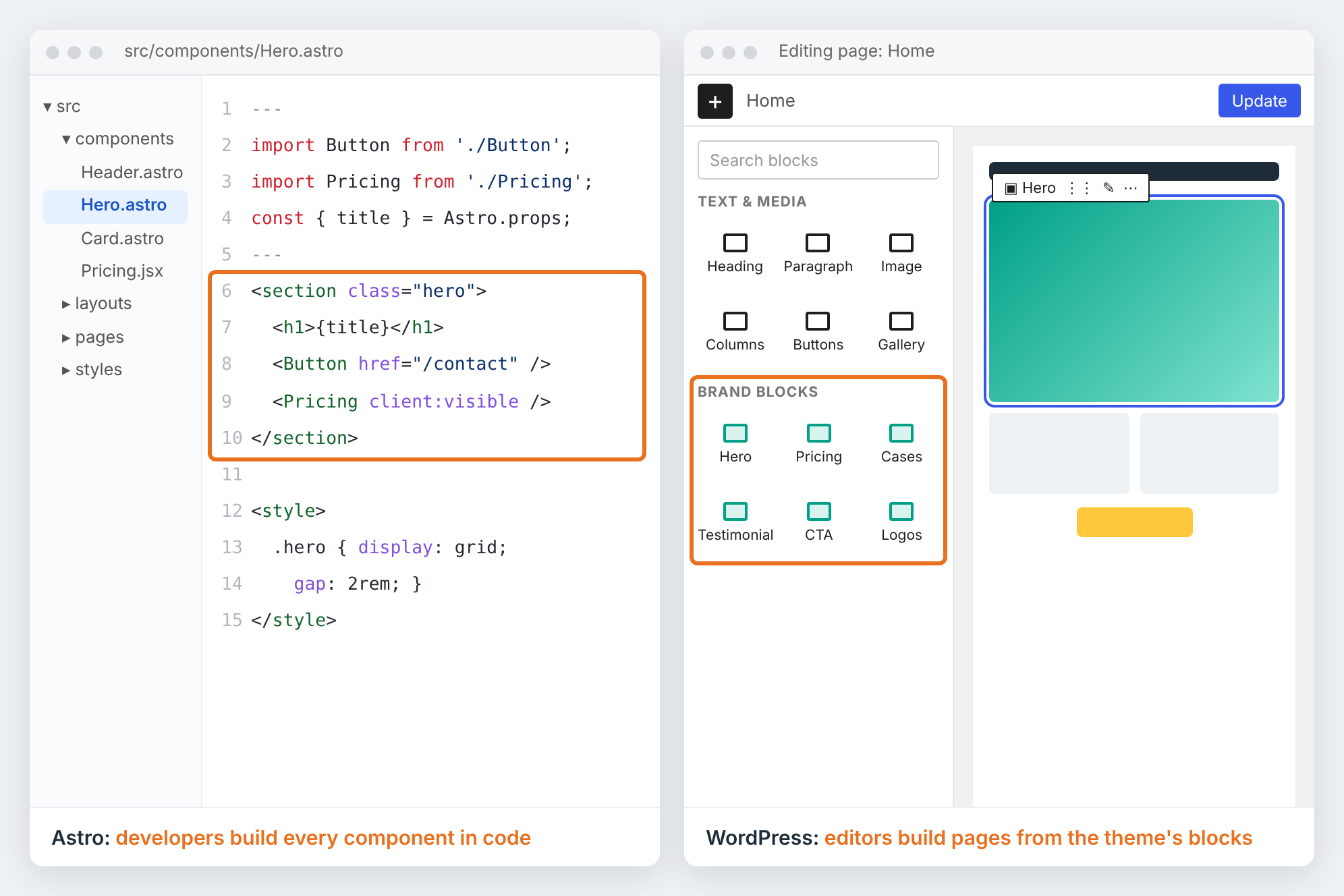
Astro gives developers more front-end freedom. WordPress gives editors more visual control, but within the limits of a theme or block library.
Astro
Astro is a component-based framework. Pages are built from reusable HTML, CSS and JavaScript components, with React or Vue available where a page needs interactivity.
With no theme to work around, developers control the whole presentation layer, which suits a highly custom new site or custom application. Editors, however, can only change what the CMS allows.
WordPress
WordPress designs are built through themes, either off the shelf or custom. A custom theme with a bespoke block library gives you a fully branded design your editors can build with.
Off-the-shelf themes and page builders launch faster, but they often add extra code. Without clear design rules, layouts also drift over time.
Winner: Astro. Developers get more front-end freedom with no theme constraints. Editor flexibility is a separate question, which WordPress wins in section 1.
5. Integrations and Plugins
WordPress has a ready-made plugin for almost every business need. On Astro, most integrations connect through APIs or are built in code.
Astro
Astro connects to forms, CRMs, analytics and search tools through APIs and embedded scripts, so the site only carries what it needs.
Less common features, such as bookings or memberships, are harder. Instead of installing a plugin, each new integration becomes a development task.
WordPress
WordPress has a mature plugin ecosystem, with tens of thousands of free plugins. HubSpot, Salesforce and most booking, membership and multilingual tools offer ready-made options, so many common integrations can be added without custom development.
Plugin quality varies, though, and overlapping plugins can clash. Each one needs vetting before it goes live.
Winner: WordPress. If your site relies on CRM, forms, bookings or multilingual content, WordPress connects them faster and for less.
6. eCommerce
WordPress runs a full online store through WooCommerce. Astro has no built-in commerce, so stores rely on a connected platform such as Shopify.
Astro
On Astro, the site handles the storefront while Shopify or Snipcart manages products, carts and checkout. The result is a very fast catalogue.
However, you pay for and manage two platforms. Customer accounts, product filtering and checkout changes usually need custom development.
WordPress
WooCommerce turns WordPress into a full store, managed from the same dashboard as your content. Products, payments, subscriptions and customer accounts all sit in one place.
Afterpay and Australia Post shipping are available through WooCommerce extensions, so these common features can be added without custom code. Large catalogues, however, need strong hosting.
Winner: WordPress. For most Australian businesses, one system for content and commerce is simpler and cheaper to run.
7. Security
Astro has a smaller public attack surface because static pages usually have no public database or login. WordPress is secure when maintained, but it needs more active upkeep.
Astro
A mostly static Astro site serves pre-built files, so there is often no public PHP, database or admin login to target.
The risk does not disappear, though. Instead, it moves to npm dependencies, the build pipeline and any connected CMS, forms or APIs, which all still need updating.
WordPress
Most WordPress risk sits in plugins rather than core. Patchstack recorded 11,334 new vulnerabilities across the WordPress ecosystem in 2025, with 91% in plugins and only six in core.
Every active plugin therefore needs regular updates and compatibility checks to avoid security issues. With managed hosting, backups and prompt updates, WordPress can be a secure platform.
Winner: Astro. Less code runs on each request, so there is less to attack. The real difference is how much surface area you have to maintain.
8. Maintenance
Astro has less to update day to day. WordPress needs more regular upkeep, but far more people can do it.
Astro
Astro shifts maintenance from plugin updates to dependency management. With no PHP or public database to patch, a static Astro site needs fewer routine platform updates.
However, npm packages, framework upgrades and the build pipeline still need a developer. For a marketing team without technical support, even a small dependency issue means calling one in.
WordPress
WordPress needs regular updates to core, themes and plugins, along with compatibility checks after each one. PHP versions and hosting also need attention over time.
The upside is choice. Thousands of agencies and freelancers can manage these updates, and many businesses cover them through a monthly care plan, so editors keep working without touching the technical side.
Winner: Depends on who maintains the site. Astro has less to patch if you have a developer on hand. WordPress is easier to keep running if you do not.
9. Cost of Ownership
Astro often costs less to host, while WordPress usually costs less to change. The cheaper option comes down to how often your site needs updating.
Astro
Without the need for hosting PHP or a database, many small Astro sites run on free or low-cost hosting tiers. The framework itself is free, and paid services are only added where you choose them.
The real cost sits in development. Every new template, feature or integration needs a developer, so a site changing often keeps adding cost long after launch.
WordPress
Custom WordPress websites in Australia typically cost from A$10,000 to A$15,000. Managed hosting, premium plugins and maintenance then add ongoing costs.
In return, your team can update content, pages and many features without a developer. For a site updated weekly, the savings in developer time often outweigh the higher running costs.
Winner: Depends on how often the site changes. Astro is cheaper for sites updated a few times a year. WordPress is cheaper once marketers make regular changes.
10. Long-Term Support and Stability
WordPress has more than two decades of history and a far larger talent pool. Astro is newer and growing fast, but a site built on it is harder to hand over.
Astro
Cloudflare acquired the Astro team in January 2026, and the framework remains open source under the MIT licence, so you keep full control of your code. Major versions arrive often, though, with versions 5, 6 and 7 released between late 2024 and June 2026.
Finding someone to take over an Astro site is also harder. Astro specialists are a much smaller pool, so changing agency or developer can take longer and cost more.
WordPress
WordPress has powered websites since 2003 and is used by 40.2% of all websites, according to W3Techs. It also has a strong record of backward compatibility, which reduces upgrade risk for well-built sites.
As a result, almost any agency or developer can pick up a WordPress site. Because the platform is standard, a new provider can work on your existing site rather than rebuilding it.
Winner: WordPress. A huge pool of agencies and developers can support a WordPress site, which lowers your long-term risk.
Astro vs WordPress by Team Type
The better platform depends on who manages the site after launch. Marketing teams need speed and independence, while developers care more about control and performance.
For Marketing Teams
WordPress is the better fit for most marketing teams, because day-to-day changes need no developer. Check how often your team needs to:
- Launch landing pages for campaigns
- Update forms, menus or SEO fields
- Add sections to existing pages
- Publish without developer access
Astro can support the same workflow, but the CMS and editing experience need to be planned and built first.
Best fit: WordPress. It gives marketers control over routine website changes.
For Developers
Astro appeals to developers who want front-end control and fewer platform constraints. It suits teams who value:
- Components built in a code editor and managed in Git
- Minimal JavaScript and tight performance control
- Content from Markdown files, APIs or any headless CMS
- A modern developer experience, familiar to anyone using other static site generators
WordPress still works well for developers when a project depends heavily on CMS features, plugins or business integrations.
Best fit: Astro for front-end control. WordPress for CMS-heavy projects.
Astro or WordPress: How to Choose the Right Platform
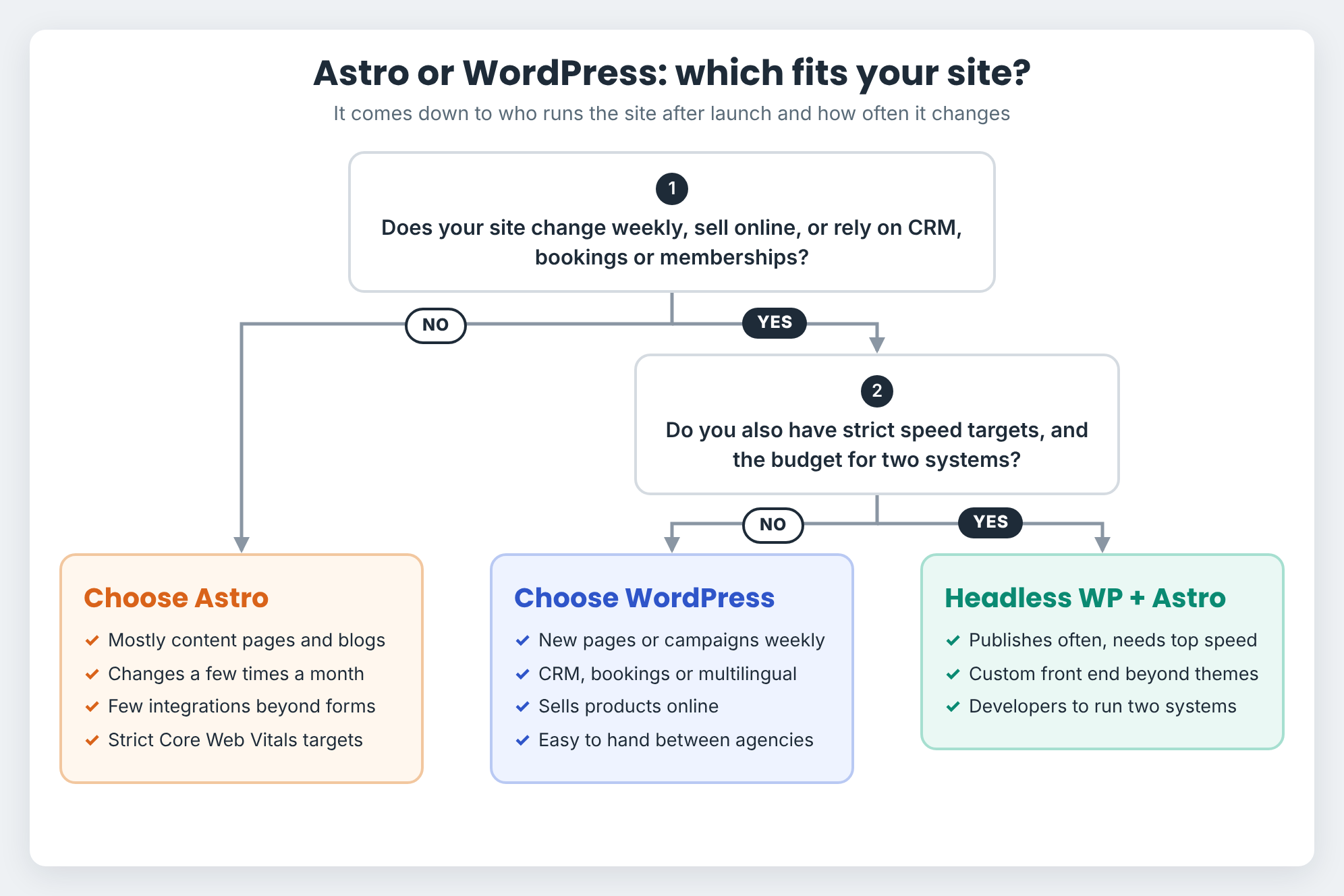
The right platform depends on who runs the site after launch and how often it changes. Use these checklists to see where your business fits.
Choose Astro If Your Site
- Is mostly content, such as service pages, blog posts or documentation
- Changes a few times a month rather than every week
- Needs few integrations beyond forms and analytics
- Has strict speed or Core Web Vitals targets
Choose WordPress If Your Site
- Changes weekly, with new pages, posts or campaigns
- Depends on CRM, bookings, memberships or multilingual content
- Sells products online
- Needs to be easy to hand over between agencies or developers
Consider Headless WordPress With Astro If Your Site
- Publishes often and has strict performance targets
- Needs a custom front end a standard theme cannot deliver
- Has the budget and developers to run two systems
Should You Migrate From WordPress to Astro?
Migrate only when Astro fixes a problem your current site cannot. Speed, upkeep costs and who edits the site should drive the decision, not the framework’s newness.
When Moving to Astro Makes Sense
Astro is worth considering when a rebuild is already on the table and your site is mostly content. Most of these should apply:
- A rebuild or redesign is already planned
- Speed problems persist after optimisation
- Content follows a predictable structure
- The site relies on few plugins or integrations
- A developer will own the site after launch
A planned rebuild is the best moment to switch, as you can rethink the front end instead of carrying old technical decisions forward.
When You Should Stay on WordPress
Moving platforms adds cost, risk and extra work, so staying put is often the smarter call. Stay on WordPress if any of these apply:
- The site is fast, secure and generating enquiries
- Marketers publish or build pages every week
- The site runs WooCommerce, memberships or bookings
- It depends on several business-critical plugins
- Nobody will own an Astro codebase after launch
A fast, well-maintained WordPress site does not need replacing simply because a newer framework exists.
Conclusion
There is no universally better platform. There is only the one suited to how your site is run.
Astro is the stronger choice for developer-led sites where speed and front-end control come first. WordPress remains the better fit for marketing teams who publish often, rely on integrations or sell online.
If you need both, headless WordPress can combine WordPress content management with an Astro front end.
Before committing to a rebuild, look at what is actually holding your site back. A slow WordPress site is often a build problem rather than a platform problem, and fixing it costs far less than starting again.
If you are unsure which applies, WP Creative can audit your current site and show whether it needs a rebuild or simply a tune-up.
Astro vs WordPress FAQs
Can you use Astro with WordPress?
Yes. WordPress can run as a headless CMS, managing content while Astro builds and serves the front end.
In this setup:
- Editors write and manage content in WordPress as usual
- Astro pulls the content through the REST API or WPGraphQL
- Visitors get fast static HTML pages from Astro
The trade-off is running two systems. Page builder layouts do not carry over, previews need building, and hosting and maintenance costs rise. Headless pays off for content-heavy sites with strict performance targets, but it should solve a specific problem rather than be added for its own sake.
Is Astro better than WordPress?
Neither is better for every site. Astro wins on speed and front-end control for developer-run sites, while WordPress suits marketing teams who publish often and rely on integrations.
Is Astro a CMS?
No. Astro is a web framework for building websites, not a content management system. To give editors a dashboard, it connects to a headless CMS such as Sanity, Storyblok or WordPress.
Is Astro faster than WordPress?
Yes, by default. Astro prepares pages at build time and sends very little JavaScript to the browser, so pages load quickly. A lean WordPress build with strong hosting and caching closes much of the gap.
Is Astro better for SEO than WordPress?
Not automatically. Astro makes technical performance easier, while WordPress makes everyday SEO easier through plugins such as Yoast SEO and Rank Math. Content quality and implementation decide rankings far more than the platform.
Is Astro free to use?
Yes. Astro is open source under the MIT licence and free to use. Your costs come from hosting, any paid CMS and the developer time needed to build and change the site.
Is Astro cheaper than WordPress?
Astro usually costs less to host, while WordPress usually costs less to change. For a site updated a few times a year, Astro can be cheaper. Once marketers make weekly changes, WordPress typically wins on total cost.
Can non-technical users edit an Astro website?
Yes, once a CMS is connected. Without one, every change means working with files, Git or code. With one, editors can update text, images and posts, but new layouts or page types still need a developer.
Can Astro replace WordPress?
For blogs, brochure sites and documentation with a predictable content model, yes. Sites running WooCommerce, memberships, bookings or many business-critical plugins need those features rebuilt or moved to other platforms, which adds cost and risk.
Will moving from WordPress to Astro affect SEO?
It can, if the move is not planned carefully. A platform change alone should not drop rankings, but lost URLs or SEO data often do. Build a redirect map for every old URL, and make your redirect plan cover metadata, canonicals, schema, XML sitemaps, internal links and tracking. Then monitor Google Search Console for at least 90 days.
Do AI coding tools make Astro easier to manage?
They help developers, but they do not replace one. AI tools can help write and update components in an Astro project quickly, yet every change still runs through code, Git and a deployment. For marketers making weekly updates, a CMS remains the simpler option.

Get Your Free Website Audit
($3,000 Value)
- Uncover performance issues
- Identify SEO opportunities
- Security gaps, and quick wins