Headless CMS vs Traditional CMS: Which Is Right for Your Business in 2026?

Get Your Free Website Audit
($3,000 Value)
- Uncover performance issues
- Identify SEO opportunities
- Security gaps, and quick wins
Table of Contents
- Headless CMS vs Traditional CMS Comparison Table
- What Is a Traditional CMS?
- What Is a Headless CMS?
- The Core Difference, Explained Simply
- 1. Ease of Use
- 2. Design and Front-End Flexibility
- 3. Pricing and Total Cost of Ownership
- 4. Performance and Speed
- 5. SEO
- 6. Security
- 7. Scalability and Multichannel Delivery
- 8. Maintenance and Developer Dependency
- 9. Integrations and Future-Proofing
- The Third Option: Hybrid and WordPress as Headless
- Migration: What Switching Actually Involves
- When to Choose a Traditional CMS
- When to Choose a Headless CMS
- Headless CMS vs Traditional CMS: Final Verdict
- Need Help Choosing or Building Your CMS?
- Headless CMS vs Traditional CMS FAQs
WordPress, the best-known traditional CMS on the web, powers 59.8% of all websites that run on a content management system. At the same time, the headless CMS market is one of the fastest-growing categories in web technology, expanding at more than 22% a year. Two very different ways to manage and deliver content. And one question that every growing business eventually lands on: which one is actually right for me?
The headless CMS vs traditional CMS debate is not about which architecture is newer. It is about how you want to create, manage, and deliver content, how many channels you publish to, and how much development resources sit behind you.
In this guide, we break down every major category, name a winner in each one, and help you walk away knowing exactly which approach fits your business.
The short answer: A traditional CMS like WordPress is the stronger choice for most businesses that need a single, content-led website with straightforward publishing and limited development resources. A headless CMS wins when you need to deliver content across multiple channels, such as a website, mobile apps, and IoT devices, or when performance at scale is a hard requirement. For many businesses already on WordPress, a hybrid setup gives you both. The right pick depends on your team, your channels, and where you are heading next.
Headless CMS vs Traditional CMS Comparison Table
Both approaches can power a great website, but they work in fundamentally different ways. Use the table below to see how a traditional CMS and a headless CMS compare across architecture, flexibility, ease of use, SEO, and everything in between.
| Feature | Traditional CMS | Headless CMS |
| Architecture | Monolithic, back end and front end tightly coupled | Decoupled, back end and front end separated |
| Content delivery | Renders content to a single web page | Delivers content to any front end via APIs |
| Front-end control | Tied to the platform’s themes and templates | Full freedom to build a custom front end |
| Ease of use | Beginner-friendly, built for non-technical users | Requires developers to build the presentation layer |
| Multichannel delivery | Mostly web-focused | Web, mobile apps, IoT, and digital touchpoints from the same content |
| Setup speed | Fast, ready-to-use out of the box | Slower, a custom front end must be built |
| Developer dependency | Low for everyday content | Higher, developers needed for the front end |
| SEO | Mature, plugin-driven control | Powerful but depends on correct rendering |
| Security | Larger plugin attack surface | Smaller surface, but API risk to manage |
| Performance | Depends on hosting and plugins | High ceiling with modern frameworks and a CDN |
| Scalability | Solid for standard websites | Built for scale across multiple channels |
| Pricing model | Often free core software plus hosting | Subscription plus front-end build and hosting |
| Best for | Content-led sites, blogs, small businesses | Omnichannel brands, apps, complex builds |
| Examples | WordPress, Drupal, Joomla | Contentful, Storyblok, Strapi, Sanity |
What Is a Traditional CMS?
A traditional CMS, sometimes called a monolithic CMS, is a content management system where the back end and the front end are bundled together in one package. The place you write and manage content is the same system that decides how that content looks and gets served to a web page.
WordPress, Drupal, and Joomla are the classic examples. WordPress alone powers 59.8% of all websites that use a CMS, according to W3Techs, which tells you how well this model has worked for the vast majority of businesses.
The appeal is simple. You log in, you use a WYSIWYG editor, you pick a theme, and you publish content without touching a line of code. Traditional content management systems use standardised templates and pre-built themes, which makes content creation fast and approachable for non-technical users. For a business that wants a website live quickly, this is a genuine strength.
The trade-off is flexibility. Because the presentation layer is locked to the platform, a traditional CMS is built first and foremost for web pages. Pushing the same content to a mobile app, a smart display, or another digital channel is harder, because the system was never designed to separate content from how it is shown.
What Is a Headless CMS?
A headless CMS is a content management system that removes the front end entirely. The “head” is the presentation layer, and a headless system chops it off. What you are left with is a pure content back end that stores your content as structured, raw data and serves it out through an application programming interface, or API.
Contentful, Storyblok, Strapi, and Sanity are some of the best headless CMS platforms. Instead of rendering a web page for you, a headless content management system delivers content to whatever front end you connect to it. That could be a website built in React, a mobile app, a kiosk, or a voice device.
This is the core idea. A headless CMS separates content from presentation. Your content lives in one place, and you can serve that same content to multiple platforms through content APIs, using whatever front-end framework your developers prefer.
The upside is reach and control. The same content can feed a web page, mobile apps, and any number of digital touchpoints without being duplicated. The catch is that a headless CMS makes the front end your responsibility. Construction of a custom front end is necessary, which increases reliance on developers and raises the initial setup cost.
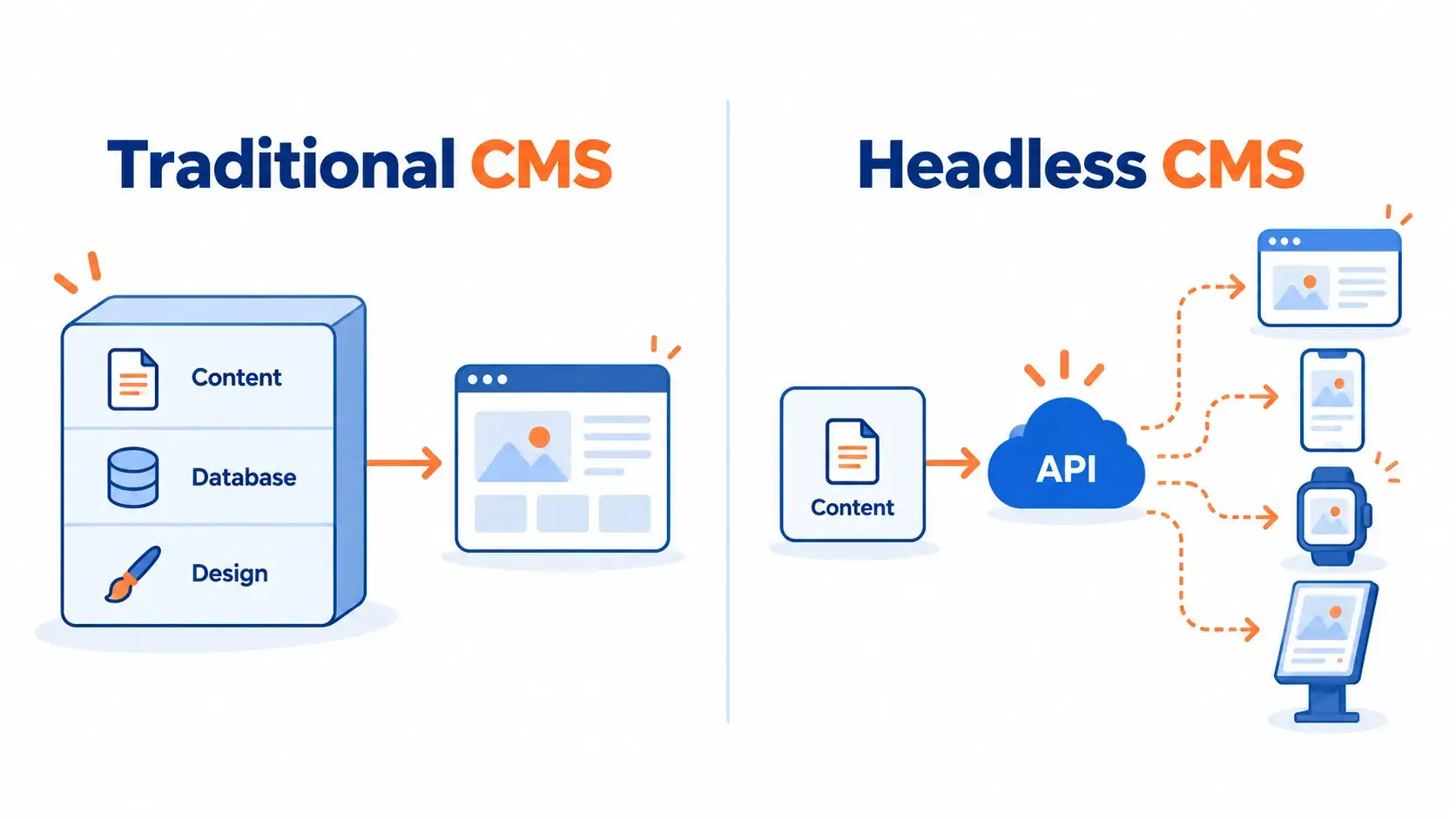
The Core Difference, Explained Simply
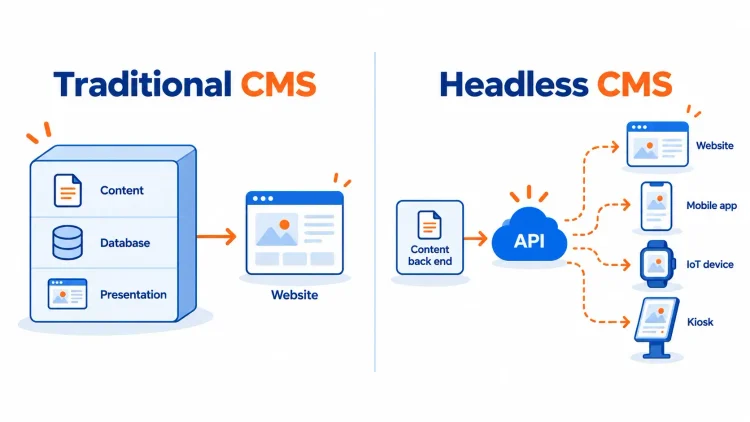
Strip away the jargon and the difference comes down to one thing: coupling.
A traditional CMS is coupled. The content and the presentation live together, so the system manages both. That makes it easy to use, but it ties your content to a single web output.
A headless CMS is decoupled. The content sits on its own and connects to the front end through APIs. That makes it flexible and channel-agnostic, but it means someone has to build and maintain the front end.
Everything else in this comparison flows from that one architectural choice. Keep it in mind as we work through each category.
1. Ease of Use
Ease of use comes down to how quickly your team can create, manage, and publish content without needing a developer on standby.
Traditional CMS
A traditional CMS is designed for non-technical users from the ground up. WYSIWYG editors, drag-and-drop builders, and live previews mean a marketing team can write, format, and publish content on their own.

Slow website wasting your marketing spend?
- Uncover performance issues
- Identify SEO opportunities
- Security gaps, and quick wins
Pros
- Built for business users with no technical knowledge required
- WYSIWYG editors make content creation and formatting simple
- Pre-built templates get you publishing quickly
- Content teams work independently of developers day to day
Cons
- Design changes beyond the theme often need code
- The editing experience is tied to the platform
Headless CMS
A headless CMS gives you a clean content back end, but there is no built-in front end to preview against. Editors work with structured content and fields rather than a visual page, which can feel abstract until the front end is connected.
Pros
- Structured content keeps your data clean and reusable
- Clear separation between content creation and presentation
Cons
- Non-technical users often need developer support to see content in context
- No native front-end preview without extra setup
- A steeper learning curve for content teams used to visual editors
Winner: Traditional CMS 🏆
A traditional CMS wins on ease of use because it was purpose-built for non-technical users. Content teams can manage content and publish content without waiting on development resources, which is exactly what most small businesses and content-led teams need.
2. Design and Front-End Flexibility
Design flexibility determines how far you can shape the user interface and the front-end experience beyond a standard template.
Traditional CMS
A traditional CMS gives you design control within the platform’s framework. Themes and page builders cover most needs, but the presentation layer is ultimately bound to the system.
Pros
- Huge library of themes and templates
- Page builders enable visual design without code
- Fast path to a polished, standard website
Cons
- The front end is tied to the platform
- Deep custom layouts can hit a ceiling
Headless CMS
A headless CMS hands the entire front-end presentation layer to your developers. They can build any user interface they want, in any modern front-end framework, because the content is delivered as raw data through an API.
Pros
- Complete freedom over the front end and user interface
- Developers use their preferred tools and frameworks
- The same content can power different platforms and custom solutions
Cons
- Every design decision requires development work
- Nothing is pre-built, so you start from a blank canvas
Winner: Headless CMS 🏆
A headless CMS wins for flexibility because it puts no limits on the presentation layer. If you need a bespoke digital experience or a front end that behaves differently across multiple devices, headless gives your developers the freedom to build exactly that.
3. Pricing and Total Cost of Ownership
Cost is where a lot of comparison articles go quiet. Here is the honest picture, because the true cost is rarely the sticker price.
Traditional CMS
Many traditional CMS platforms, WordPress included, are free at the core. You pay for hosting, a theme, and any premium plugins. For a standard content-led website, the total cost of ownership stays predictable and relatively low. In Australia, a custom WordPress website typically starts in the range of AUD 10,000 to 15,000, because themes, plugins, and built-in features cut down custom development time.
Pros
- Free or low-cost core software
- Predictable hosting and plugin costs
- Large pool of affordable talent to build and maintain it
Cons
- Plugin and premium theme costs add up
- Cheap hosting hurts performance and security
Headless CMS
A headless CMS usually runs on a subscription for the content back end. Then you add the cost of building a custom front end and hosting it separately, which is why a comparable headless build commonly starts well above a traditional one. Headless CMS may require more technical resources and a higher initial setup cost, which is the part that surprises teams who only looked at the platform’s monthly price.
Pros
- Subscription pricing is predictable at the platform level
- You only pay for the channels and scale you use
Cons
- Front-end build costs are significant and ongoing
- More development resources needed to launch and maintain
- Two systems to host and manage instead of one
Winner: Traditional CMS 🏆
For most businesses, a traditional CMS wins on total cost of ownership. The lower setup cost and the smaller demand on development resources make it the more economical option for a standard website. Headless earns its cost when you are genuinely publishing across multiple channels, not before.
4. Performance and Speed
Site speed affects rankings, conversions, and how your brand feels to a visitor. Both approaches can be fast, and both can be slow. It comes down to how they are built.
Traditional CMS
Performance on a traditional CMS depends on your hosting, your theme, and your plugins. A lean setup is quick. A plugin-heavy one is not.
Pros
- Caching and CDN plugins are mature and easy to add
- Good managed hosting delivers strong, consistent speed
Cons
- Plugin bloat and heavy themes slow the site down
- Every added feature can cost you load time
Headless CMS
A headless CMS pairs naturally with modern front-end frameworks, server-side rendering, and a content delivery network. Developers control exactly what loads, which is why headless builds can hit excellent Core Web Vitals scores.
Pros
- Modern frameworks and server side rendering enable fast load times
- A content delivery network serves content close to every user
- Developers control the payload, so nothing loads that is not needed
Cons
- Speed depends entirely on how well the front end is built
- A poor build can be just as slow as anything else
The gains are real when it is done well. When Backlinko rebuilt on a headless WordPress and Next.js setup, the migration documented by the agency Bejamas delivered 3x faster page loading, a First Contentful Paint of 1.3 seconds, a Largest Contentful Paint of 1.7 seconds, and a 64% lift in performance score. That is the ceiling a headless front end can reach with the right build behind it.
Winner: Headless CMS 🏆
A headless CMS wins on performance ceiling. When the front end is built properly with a modern framework and a CDN, headless delivers content faster than a typical plugin-laden traditional build. The gain is real, but only with the right development behind it.
5. SEO
This is where a lot of headless projects quietly go wrong, and where a fair comparison matters most. Both approaches can rank. Both can also fail.
Traditional CMS
A traditional CMS, especially WordPress, has the most mature SEO toolkit on the web. Plugins like Yoast and RankMath give you full control over titles, meta, schema, sitemaps, and redirects with no development work.
Pros
- Mature SEO plugins with deep, out-of-the-box control
- Content teams manage on-page SEO without a developer
- Server-rendered pages are indexed reliably by default
Cons
- Plugin quality and site speed still need managing
Headless CMS
A headless CMS can absolutely improve SEO by accelerating content delivery speed, but only if the front end renders content in a way search engines can read. Get the rendering wrong, for example relying on client-side JavaScript alone, and Google may struggle to index your pages at all.
Pros
- Fast delivery and strong Core Web Vitals support rankings
- Full control over technical SEO in the front-end code
Cons
- Requires correct server-side rendering or static generation to be indexable
- SEO controls are not built in, they must be developed
- A weak build can damage visibility badly
Winner: Draw ⚖️
This one is an honest draw. A traditional CMS wins on ease and reliability, giving your marketing team direct control with no development dependency. A headless CMS wins on raw speed and technical control, but only in expert hands. The right choice depends on whether SEO is run by your content team or your developers, and either way the fundamentals of technical SEO apply regardless of architecture.
6. Security
Security matters the moment your site holds customer data or a reputation you cannot afford to lose. Neither approach is automatically safer. They simply move the risk to different places.
Traditional CMS
A traditional CMS carries a larger attack surface because it relies on plugins and themes. That flexibility is also a liability. Research from Patchstack found that nearly 30% of critical WordPress plugin vulnerabilities never receive a patch, which is why maintenance discipline matters so much.
Pros
- Mature security plugins, firewalls, and managed hosting options
- A huge community that finds and fixes issues fast
Cons
- Plugins and themes expand the attack surface
- Missed updates are a common entry point for attacks
Headless CMS
A headless CMS has a smaller surface, because there is no public-facing plugin ecosystem sitting on the content back end. The content is separated from the front end, which isolates it. The trade-off is that your APIs and integrations become the thing you must secure.
Pros
- Decoupled architecture isolates the content back end
- Fewer plugins means fewer plugin vulnerabilities
Cons
- APIs and integrations introduce their own risks to manage
- Security still depends on how the front end is built
Winner: Draw ⚖️
Another fair draw. A headless CMS reduces plugin risk, while a traditional CMS has deeper, more mature security tooling to lean on. Both are secure when maintained properly, and both are exposed when they are not. Security is a discipline, not a platform feature.
7. Scalability and Multichannel Delivery
Scalability is about handling growth. Multichannel delivery is about serving content wherever your audience is. These two increasingly go together.
Traditional CMS
A traditional CMS scales well for a growing website, but its monolithic nature makes true multichannel delivery harder. It was built to render web pages, so serving the same content to mobile apps or other digital channels usually means workarounds.
Pros
- Handles a growing standard website comfortably
- Familiar scaling path with managed hosting
Cons
- Monolithic design limits flexibility across channels
- Multichannel delivery is awkward by design
Headless CMS
A headless CMS is built for this. One content source, delivered through APIs to a website, mobile apps, IoT devices, and any digital touchpoint. Headless CMS architecture supports omnichannel content delivery and allows for near-indefinite scalability without a performance hit, because the front ends scale independently of the content back end.
Pros
- One content source feeds multiple platforms and channels
- Delivers content to websites, apps, and IoT devices alike
- Scales across digital channels without duplicating content
Cons
- More moving parts to architect and maintain
Winner: Headless CMS 🏆
A headless CMS wins clearly on scalability and multichannel delivery. If your business publishes to more than a website, or plans to, the decoupled model is built for exactly that job.
8. Maintenance and Developer Dependency
The work does not stop at launch. What happens afterwards decides how much of your team’s time the platform quietly consumes.
Traditional CMS
A traditional CMS asks for ongoing maintenance, core updates, plugin updates, and backups, but it frees your content team to work without a developer. That balance suits most content operations.
Pros
- Content teams create and publish content independently
- No developer needed for everyday updates
Cons
- Regular core, theme, and plugin maintenance required
- Skipping updates creates real security risk
Headless CMS
A headless CMS reduces plugin maintenance but increases developer dependency. Content editing is independent, but anything touching the front end, and often the publishing setup itself, runs through your development resources.
Pros
- Fewer plugins to patch and monitor
- Cleaner separation of concerns for developers
Cons
- Front-end changes rely on developers
- Two systems to maintain rather than one
Winner: Traditional CMS 🏆
For day-to-day independence, a traditional CMS wins. In Storyblok’s 2024 research, 40% of teams said collaboration between marketers and developers is ineffective or barely exists. They will recognise the value of a system their content team can run without raising a ticket for every change.
9. Integrations and Future-Proofing
The last question is how well each approach adapts to what comes next, from new tools to AI.
Traditional CMS
A traditional CMS integrates through plugins, which is convenient but can be limiting. In the same Storyblok research, 24% of companies said their CMS integrations are difficult, and a monolithic system can make connecting new technologies harder than it should be.
Pros
- Large plugin marketplace for common integrations
- Familiar, well-documented connections
Cons
- Integrations rely on plugin availability and quality
- Harder to connect emerging channels and tools
Headless CMS
A headless CMS is API-first, so it connects to almost anything and adapts as new technologies emerge. Structured content is also far easier for AI systems to read, reuse, and repurpose, which matters more every year.
Pros
- API-first design integrates with modern tools seamlessly
- Adapts quickly to new technologies and channels
- Structured content is ready for AI and automation
Cons
- Integrations are built, not installed
- Requires development to wire everything together
Winner: Headless CMS 🏆
A headless CMS wins on integrations and future-proofing. The API-first, structured-content model is better suited to a digital landscape that keeps adding channels, tools, and AI-driven experiences.
The Third Option: Hybrid and WordPress as Headless
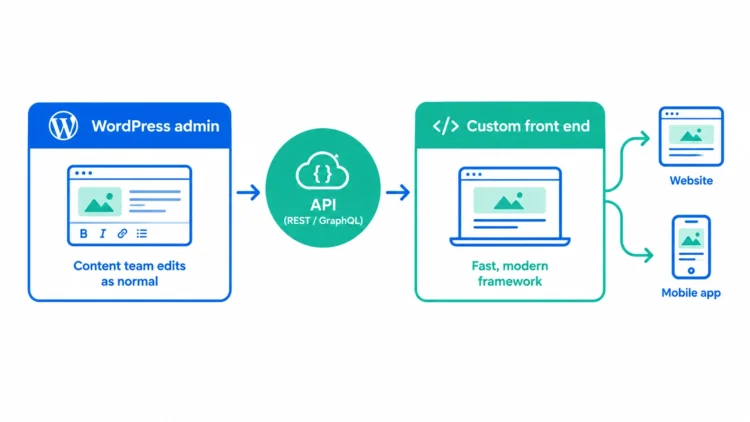
Here is what almost no comparison tells you. This is not a binary choice.
A hybrid CMS, sometimes called headless WordPress, lets you keep the friendly editing experience of a traditional CMS and still deliver content through APIs to a custom front end. You get the WYSIWYG editor and mature SEO tooling your content team already knows, plus the front-end freedom and multichannel reach of headless.
For a business already on WordPress, this is often the smartest path. You do not throw away a platform your team is comfortable with, and you do not force everyone to learn a new content back end. You add a decoupled front end where it earns its keep, and you keep the parts that already work.
This is exactly the kind of decision worth talking through before you commit, because the right answer depends on your team, your channels, and your roadmap, not on which architecture is fashionable.
Migration: What Switching Actually Involves
If you decide to move from a traditional CMS to a headless or hybrid setup, it helps to know what the project actually looks like.
- Your content needs to be restructured into a modelled, reusable format rather than page-by-page layouts
- A new front end has to be designed and built, because the presentation layer does not transfer
- URLs and redirects must be mapped carefully to protect your SEO and rankings
- Integrations, forms, and any custom functionality need to be rebuilt or reconnected
- Content itself can usually be migrated in a structured export, but design and functionality are rebuilt
This is a development project, not a plugin install. Done well, it protects your traffic and sets you up to scale. Done carelessly, it can cost you rankings overnight. The planning is where the value is.
When to Choose a Traditional CMS
A traditional CMS is the right choice if:
- Your website is the main channel and content is central to how you grow
- Your content team needs to publish content independently, without developers
- You want a lower setup cost and predictable ongoing costs
- SEO is run by your marketing team using mature, plugin-driven tools
- You are a small to medium business that wants to move fast
- You value a large talent pool and a proven, well-supported platform
When to Choose a Headless CMS
A headless CMS is the stronger fit if:
- You deliver content to multiple channels, such as a website, mobile apps, and digital touchpoints
- You need a fully custom front end or a bespoke digital experience
- You have development resources, in-house or through a partner
- Performance at scale and modern front-end frameworks matter to you
- You are building for the long term across an expanding digital landscape
- Structured content and AI-readiness are part of your strategy
Headless CMS vs Traditional CMS: Final Verdict
Both approaches can run a successful digital presence, but they solve different problems.
A traditional CMS wins when you want simplicity, speed to launch, content-team independence, and a predictable cost. For most content-led websites and small businesses, it remains the practical choice, which is exactly why WordPress still powers close to 60% of the CMS market.
A headless CMS wins when flexibility, performance at scale, multichannel delivery, and future-proofing matter enough to justify the extra build and the development resource behind it. For omnichannel brands and ambitious digital products, it is the stronger foundation.
And for a lot of businesses, the honest answer is neither extreme. A hybrid setup, or headless WordPress, gives you the editing experience your team already knows with the front-end freedom your roadmap needs.
The real decision is not headless or traditional. It is which model matches how your business creates, manages, and delivers content, today and where you are heading next.
Need Help Choosing or Building Your CMS?
If you are weighing up a traditional CMS, a headless CMS, or a hybrid build, WP Creative can help you make the call and then deliver it.
We design and build high-performance websites across both models, so our advice is not tied to selling you one architecture. We help you choose the approach that fits your business, then build it to perform.
What we can help you with:
- Traditional CMS and WordPress website design and development
- Headless and hybrid WordPress builds
- CMS architecture strategy and platform selection
- Migrations that protect your SEO and rankings
- Website speed, SEO, and performance optimisation
Planning a headless project? Our headless developers in Melbourne and Sydney can help with strategy, platform selection, development, migration and ongoing support.
Get in touch with WP Creative today!
Headless CMS vs Traditional CMS FAQs
What is the main difference between a headless CMS and a traditional CMS?
The main difference is architecture. A traditional CMS is monolithic, meaning the back end and the front end are tightly coupled, so the same system manages content and controls how it appears on a web page. A headless CMS is decoupled. It separates content from presentation and delivers content to any front end through an API. In short, a traditional CMS is built around web pages, while a headless CMS is built around structured content that can serve multiple platforms.
Want the familiarity of WordPress with a more modern build process? Our WordPress developers in Sydney can help.
Is a headless CMS better than a traditional CMS?
Neither is better in absolute terms. A headless CMS is the stronger choice for omnichannel delivery, custom front ends, and scaling across multiple devices and digital channels. A traditional CMS is better for content-led websites that need ease of use, fast setup, and independence for non-technical users. The right option depends on how many channels you publish to and how much development resource you have.
Is a headless CMS good for SEO?
A headless CMS can be very good for SEO because it improves content delivery speed and Core Web Vitals, but only if the front end renders content correctly using server-side rendering or static generation. If pages rely on client-side JavaScript alone, search engines may struggle to index them. A traditional CMS like WordPress offers more mature, out-of-the-box SEO control that your marketing team can manage without a developer. Both can rank well when built properly.
Can WordPress be used as a headless CMS?
Yes. WordPress can run as a headless CMS, often called headless WordPress or a hybrid setup. Your team keeps the familiar WYSIWYG editor and SEO tools, while content is delivered through an API to a custom front end built in a modern framework. This gives you the ease of use of a traditional CMS with the flexibility and multichannel reach of headless, which makes it a popular path for businesses already on WordPress.
Is a headless CMS more expensive than a traditional CMS?
Usually, yes, at least to set up. A headless CMS often involves a platform subscription plus the cost of building and hosting a custom front end, which requires more development resources. A traditional CMS typically has a lower setup cost, especially with free core software like WordPress. Headless becomes cost-effective when you genuinely publish across multiple channels, where reusing the same content offsets the higher build cost.
Which CMS is best for a small business?
For most small businesses, a traditional CMS is the practical choice. It offers low cost, fast setup, and an editing experience that non-technical users can run without a developer. A headless CMS makes more sense when a small business has genuine multichannel needs, such as a website plus a mobile app, or a specific requirement for a custom front end. If your website is your main channel, traditional is usually the smarter starting point.
For businesses that want a more custom build without the full complexity of headless, our AI website development services can also help speed up parts of the development process.

Get Your Free Website Audit
($3,000 Value)
- Uncover performance issues
- Identify SEO opportunities
- Security gaps, and quick wins