What Is Managed WordPress Hosting and Why Is It Important?

Your website generates leads, supports campaigns and may even process customer orders. But when it slows down, gets hacked or breaks after an update, who’s responsible for fixing it?
The answer depends on your hosting. Managed WordPress hosting handles much of the technical work for you, but not every plan covers what you’d expect. Knowing what managed WordPress hosting is, what it includes and where it falls short helps you decide whether it’s worth it for your business.
What Is Managed WordPress Hosting?
Managed WordPress hosting is a hosting service where the provider takes care of the technical side of running a WordPress website, typically including server maintenance, security, backups, WordPress core updates and performance optimisation.
Unlike basic web hosting, it uses infrastructure configured specifically for WordPress, with features such as server-level caching, staging environments and specialised support.
It’s particularly suited to business websites and online stores that need reliable performance without managing the hosting environment themselves.
How Does Managed WordPress Hosting Work?
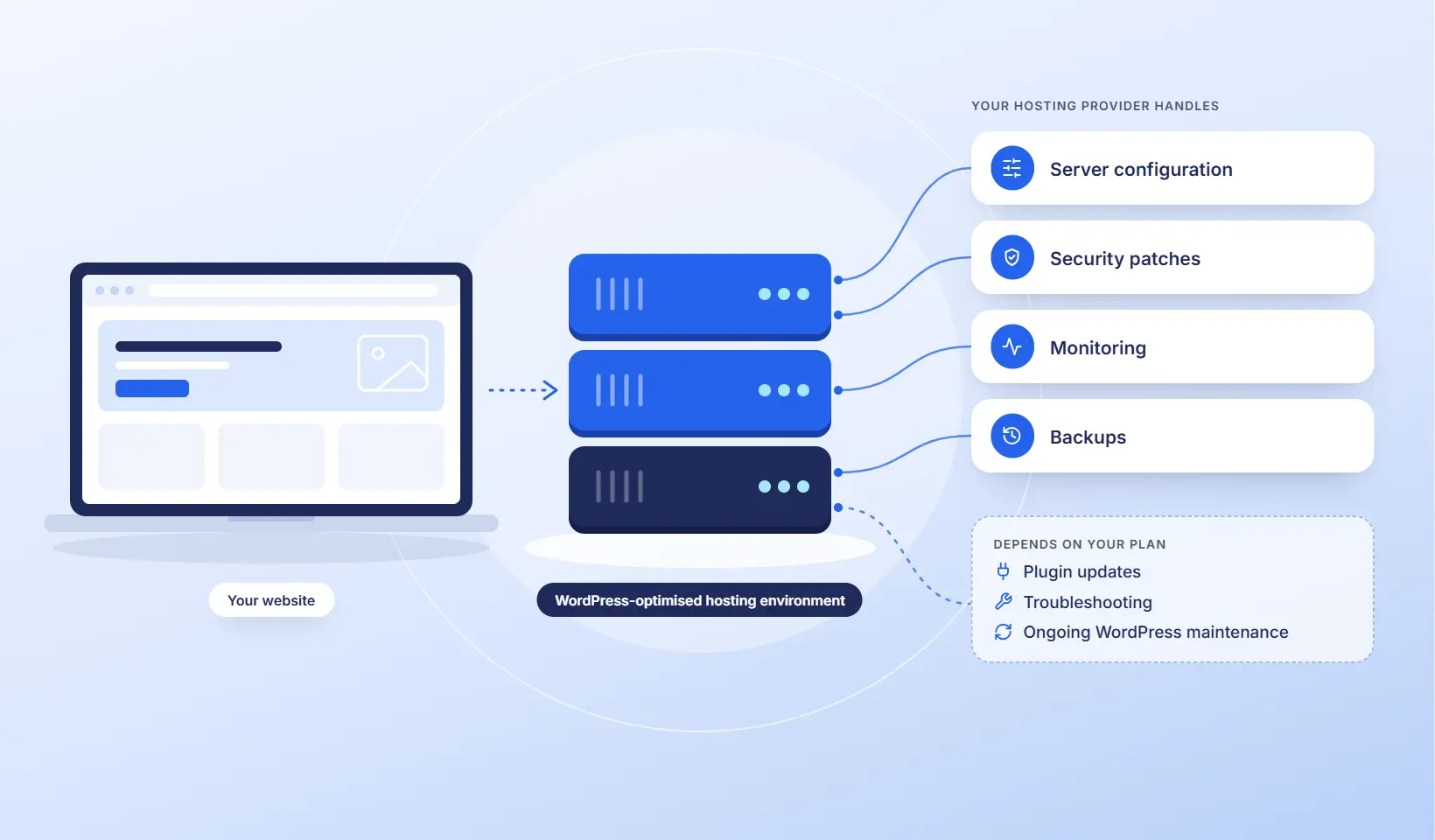
Your provider sets up and maintains a WordPress-optimised hosting environment. They handle server configuration, website security patches, monitoring and backups, while you focus on your website’s content and running your business.
Most managed hosting plans also include a hosting dashboard for managing backups, staging and other settings.
The level of support depends on your provider and plan. Some focus on the server only, while others also handle plugin updates, troubleshooting and ongoing WordPress maintenance.
Who Is Managed WordPress Hosting For?
Managed WordPress hosting suits site owners whose website plays a direct role in revenue, leads or reputation.
It’s a good fit for:
- Business websites that generate leads and need consistent performance
- Online stores where downtime or slow checkouts cost sales
- Marketing teams running campaigns that drive traffic spikes
- Growing websites that need more server resources or technical support
- Agencies managing multiple client websites
- Teams without the technical skills or time to manage updates, security and backups
It may not be necessary for:
- Personal blogs or hobby sites with low traffic
- Developers who want full server control and are comfortable managing it themselves
8 Benefits of Managed WordPress Hosting
The real value of managed WordPress hosting is what it prevents: slow pages that lose sales, hacks that damage trust, and updates that break your site at the worst moment. Each benefit below explains what you gain and what to look for in a plan.
1. Faster WordPress Performance
Managed hosts run on infrastructure optimised for WordPress, often with server-level caching, object caching and a CDN. Many also include specialised performance plugins. Faster pages keep visitors engaged and support your search visibility.
Speed has a direct commercial impact. Deloitte’s Milliseconds Make Millions study found that a 0.1-second improvement in mobile site speed was linked to an 8.4% increase in retail conversions.
Hosting gives you a faster foundation, but it won’t fix heavy images, bloated plugins or poor code on its own.
Look for: servers in Australia if most of your visitors are local, plus server-level caching and a CDN.
2. Stronger Website Security
Managed hosting typically includes layered protection, such as a web application firewall (WAF), DDoS and brute-force login protection, malware scanning and automatic security patches.
Free SSL certificates are typically included, so data passing between your site and visitors stays encrypted.
Look for: malware removal included in the plan, not just malware scanning. Some hosts detect a hack but charge to clean it up.

Slow website wasting your marketing spend?
- Uncover performance issues
- Identify SEO opportunities
- Security gaps, and quick wins
3. Automatic Backups and Easier Website Recovery
Your site is backed up automatically, with frequency and retention depending on your plan. If an update fails or your site is hacked, you can restore a working version quickly.
Look for: at least 30 days of backup retention. Some plans keep only 7 days, which may not be enough if a problem goes unnoticed. Online stores should also look for backups more often than once a day.
4. WordPress Updates Handled for You
Most managed hosts apply WordPress core updates automatically, and many providers also manage plugin and theme updates, so security fixes go out without your team chasing them.
Look for: plugin and theme updates included in the plan. Some hosts only update WordPress core, or charge extra for plugins.
5. Expert WordPress Technical Support
Support teams understand WordPress, not just servers, so problems get diagnosed faster.
Look for: published response times and support hours. Also check whether support will fix plugin conflicts, or only confirm the server is working.
6. Better Reliability and Scalability
Many managed hosts offer uptime guarantees of 99.9% or higher, backed by round-the-clock monitoring. Some plans can also scale server resources during traffic spikes, helping your site stay online during campaigns and sales.
Look for: what happens when you exceed your plan limits. Some hosts charge overage fees, while others contact you before changing anything.
7. Staging Environments for Safer Changes
A staging site is a private copy of your website. You can test updates, new features and WordPress website design changes there, then push them live once everything works. An online store can test checkout changes without risking sales, and a marketing team can preview landing pages before a campaign launches.
Look for: staging included in your plan, not just on higher tiers.
8. Less Technical Work and Fewer Hidden Costs
Without managed hosting, someone on your team has to apply updates, check backups, monitor security and troubleshoot server problems. With it, the hosting provider takes care of that work, so your team can focus on creating content, running campaigns and generating leads.
It can also cut costs that never appear on your hosting bill, such as emergency developer fixes, malware cleanups and sales lost to downtime. Many providers include free site migration too, so you can switch hosts without handling the move yourself.
Look for: a plan that clearly lists which tasks the provider handles, plus free migration if you’re switching hosts.
Managed vs Shared vs VPS Hosting: What’s the Difference?
The main differences between managed, shared and VPS hosting are how server resources are allocated, who handles technical maintenance and how much control you have over your hosting environment.
| Feature | Shared hosting | VPS hosting | Managed WordPress hosting |
|---|---|---|---|
| How it works | Your site shares one server with many others | Your site gets its own virtual server with allocated resources | Your site runs on servers optimised for WordPress, with the technical work handled for you |
| Server resources | Shared, so other sites can slow yours down | Allocated to your virtual server | Depends on the plan. Higher-tier plans usually include more resources, and some providers isolate each site |
| Performance | Can drop as traffic grows | Strong, if configured well | Optimised for WordPress, usually with server-level caching and a CDN |
| Updates and security | You handle them | You handle them, unless it’s a managed VPS | The provider handles core updates and security. Plugin updates vary by plan |
| Server control | Limited | Full, usually including root access | Moderate. The provider manages the server, so some settings are restricted |
| Technical skills needed | Low to medium | High | Low |
| Support | General hosting support | Mainly server support | WordPress specialists |
| Typical cost (AUD per month) | $5–$30 | $15–$300+ | $40–$400+ |
| Best for | Personal blogs and low-traffic sites | Developers who want full server control | Business websites and online stores |
Managed hosting is a service model, not a server type, so it can run on shared, cloud or VPS infrastructure. Dedicated hosting, where you rent an entire physical server, is usually only necessary for very large or complex websites.
What Managed WordPress Hosting Doesn’t Always Include
Managed WordPress hosting covers the hosting environment, but your provider may not look after everything on the website itself.
For example, if a plugin conflict breaks your contact form, your host might confirm the server is working and leave the fix to you or your developer.
What’s often not included:
- Website fixes: plugin conflicts, broken forms and checkout errors
- Plugin and theme updates: some hosts only update WordPress core, or charge extra for plugin updates
- Design and content changes: new pages, features and website improvements
- Website performance fixes: caching is usually included, but fixing slow plugins, large images and Core Web Vitals issues often isn’t
- Technical SEO: fixing indexing and structured data issues
- Business email: may need a separate email hosting service
Other limitations to consider:
- Plan limits: traffic, storage and bandwidth caps, sometimes with overage fees.
- Plugin restrictions: some plugins may be blocked for security or compatibility reasons.
- Paid add-ons: advanced CDN, malware removal or uptime monitoring may cost extra.
Before choosing a plan, check whether your provider supports your WordPress website or only the hosting environment.
Read More: Top WordPress Hosting Themes
How Much Does Managed WordPress Hosting Cost in Australia?
Managed WordPress hosting in Australia typically costs between A$40 and A$400+ a month. Most plans fall into three price ranges, depending on your traffic, server resources and the level of support included.
| Plan level | Typical cost (AUD per month) | Best for | What’s usually included |
|---|---|---|---|
| Entry | $40–$100 | Brochure sites and low-traffic business websites | Daily backups, free SSL, staging and standard support |
| Business | $100–$250 | Lead generation and content-heavy sites | More server resources, uptime monitoring and priority support |
| Premium | $250–$400+ | Online stores, memberships and high-traffic sites | More server resources, more frequent backups and performance tuning |
Watch for hidden costs: intro discounts that rise at renewal, prices in US dollars or excluding GST, and core features sold as add-ons. Compare the total yearly cost, not the first month’s price.
For provider-by-provider pricing, see our guide to the best WordPress hosting in Australia.
How to Choose a Managed WordPress Hosting Provider
The best managed WordPress hosting provider isn’t necessarily the cheapest or the one with the most features. It’s one that meets your website’s needs and provides reliable support when something goes wrong.
What to look for in a business website plan:
- Australian servers, if most of your visitors are local
- Daily backups, ideally retained for at least 30 days, with more frequent options for busy websites
- Staging included in your chosen plan
- Malware removal, not just malware scanning
- WordPress-specific support with published support hours and response times
Red flags:
- Extra charges for plugin updates or malware cleanup that aren’t disclosed upfront
- Low introductory prices with hidden renewal increases
- “Unlimited” resources without a clear usage policy
- Support limits that aren’t explained before you sign up
- Traffic overage fees without advance warning
Before you sign, ask each provider three questions:
- What happens if my website goes down?
- Who removes malware if my website gets hacked?
- Who fixes it if an update breaks my site?
Why Choose WP Creative for Managed WordPress Hosting?
Most hosting providers manage your server. At WP Creative, the same team looks after your hosting and your WordPress website, so you’re never stuck chasing different providers when something breaks.
With over a decade of experience and more than 1,200 brands served, we know what businesses need from hosting: reliable performance, strong website security and support that goes beyond the server.
What you get with WP Creative:
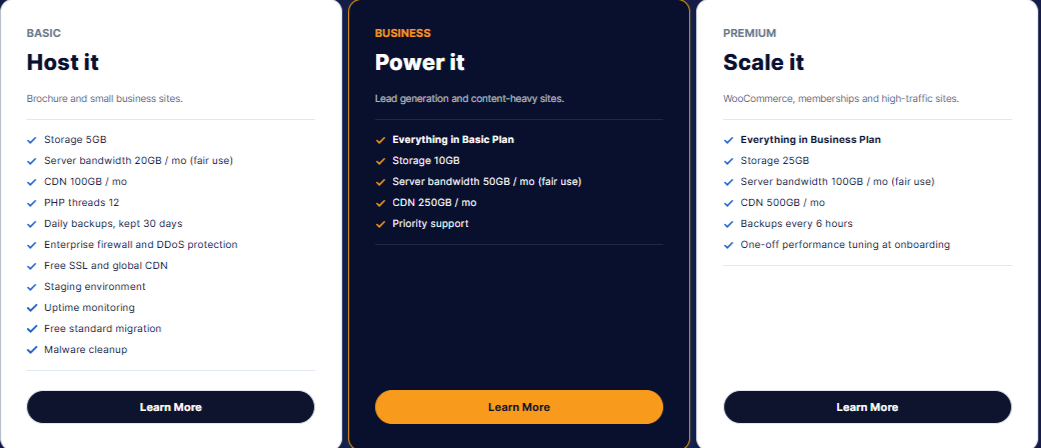
- Fast response when your site goes down: Critical (P1) incidents get a response within 1 hour and a fix within 4 hours, 8 am to 8 pm, on every plan.
- Malware cleanup included: if your site gets hacked, cleanup is covered on every plan.
- Safer updates: core, theme and plugin updates are tested on staging and applied by our team, so updates are checked before they reach your live site.
- Security patches handled for you: PHP and server patches are tested on staging and applied by our team. When a critical vulnerability is announced, you hear what we’ve done, not what you need to do.
- Australian hosting: your website, its data and its daily backups stay in Australia.
- Performance and protection: server and edge caching, a global CDN, and bot and attack filtering.
- Reliable backups: daily backups kept for 30 days, and every 6 hours on our top-tier plan.
- Campaign preparation: tell us about a launch or sale, and we’ll prepare your server before the traffic arrives.
- Free migration: standard migrations are free, and planned around your campaigns.
Not sure if you need to switch? Check out our managed WordPress hosting plans and request a free hosting review. We’ll check your site’s speed, security and setup, and tell you honestly whether moving is worth it.
Conclusion
Managed WordPress hosting is worth it when your website plays a direct role in your business. It takes server maintenance, security and backups off your plate, helping keep your site fast, secure and online.
But hosting support doesn’t always cover broken plugins, failed updates or problems with the website itself.
Before signing up, check exactly what your provider manages, what’s excluded and how quickly they’ll respond to critical issues. That’s what separates a hosting plan that looks good on paper from one your business can rely on.
Managed WordPress Hosting FAQs
Is managed WordPress hosting worth it?
Yes, if your website brings in leads or sales, or supports your brand. Managed hosting keeps your site fast, secure and backed up, and reduces the risk of website downtime costing you business.
It’s usually worth it if you run a business site or online store, launch regular campaigns, or don’t have an in-house developer. It may not be worth it for a personal blog, a hobby site or a developer who’s happy managing their own server.
Is managed WordPress hosting better than shared hosting?
For most business websites, yes. Managed hosting runs on optimised infrastructure, includes automatic updates and gives you WordPress-specific support. A shared hosting plan suits low-traffic sites, but it can slow down as traffic grows, and maintenance stays with you. Some managed plans also run on shared infrastructure, so compare the actual resources included.
Does managed WordPress hosting include website maintenance?
Not always. Most providers handle the technical aspects of hosting, including server updates, security and backups. Fewer cover website maintenance, such as fixing plugin conflicts, broken forms or design changes. Check what your plan includes before signing up.
Why is my WordPress site slow, and will managed hosting help?
It can. Slow sites are often caused by an overloaded or overseas server, and managed hosting can improve server response time through server-level caching, especially with servers in Australia. But heavy themes, bloated plugins and large images also slow sites down, and hosting alone won’t fix those. Google PageSpeed Insights is a free tool that shows where your speed issues come from.
Can I use managed WordPress hosting for WooCommerce?
Yes, and it’s especially valuable for online stores. Carts, checkouts and customer accounts can’t be fully cached, so stores need more server resources than standard websites. Look for a managed WordPress plan with object caching, frequent backups and strong security to protect customer data.
Can I install my own plugins on managed WordPress hosting?
Yes, in most cases. Some providers block specific plugins that conflict with their caching or security setup, such as certain backup or caching plugins. Check the provider’s list of restricted plugins before you move.
Do I need technical knowledge to use managed hosting?
No. The provider handles the server, security, backups and updates, and expert support is available when something goes wrong. You’ll still manage your website’s content, and any maintenance your plan doesn’t include.
Can I move my existing WordPress site to managed hosting?
Yes. Many managed hosts offer free migration for standard websites. Your site is copied to the new server and tested, then your domain is switched over, usually with little or no downtime. Large or complex sites, such as multisite or stores with custom integrations, may be quoted separately.

Get Your Free Website Audit
($3,000 Value)
- Uncover performance issues
- Identify SEO opportunities
- Security gaps, and quick wins